Building ntsc-rs from source
Install Rust
The first step is to install the latest version of Rust. Even if you're using Linux and Rust is available in your package manager, the version may be too outdated to build ntsc-rs.
To obtain the latest stable version of Rust, install rustup and then run:
rustup install stable
You may need to close and reopen your terminal after this.
Install rust-bindgen's requirements (OpenFX only)
If you want to build the OpenFX plugin, you'll need to install some dependencies for the rust-bindgen tool to work.
If you're not building the OpenFX plugin, you can ignore this part.
Clone the repository
Make sure to include submodules when cloning the repository if you want the OpenFX plugin to build properly:
git clone --recurse-submodules https://github.com/ntsc-rs/ntsc-rs.git
cd ntsc-rs
If you've already cloned the repository without submodules, you can initialize them via:
git submodule update --init --recursive
Platform-specific instructions
After installing Rust and cloning the repository, the steps are platform-specific:
Windows
-
Download and run the MSVC version of the GStreamer installer (only necessary for the standalone application). For most PCs, you'll want "MSVC x86_64".
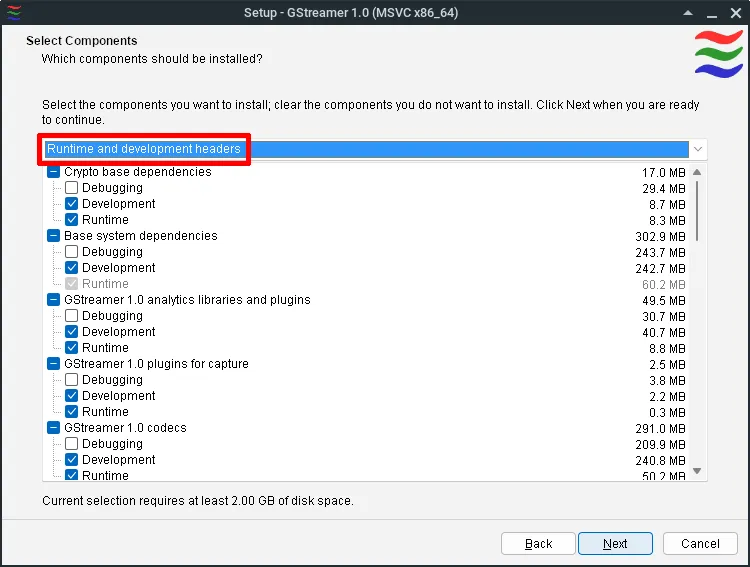
When you get to the "Select Components" part of the installer, make sure you select the "Runtime and development headers" option from the menu at the top.
For H.264 encoding, ensure the following items are selected (they should be by default, but just make sure):
- GStreamer 1.0 codecs under the GPL license
- GStreamer 1.0 codecs under the GPL license + with patent issues
- GStreamer 1.0 restricted codecs with potential patent issues in some countries
- GStreamer 1.0 libav wrapper
-
If you installed GStreamer, follow their instructions for setting the
PATHenvironment variable. Currently, those instructions don't provide instructions for PowerShell--in such a case, you can setPATHvia:$Env:PATH += ";C:\gstreamer\1.0\msvc_x86_64\bin"(replace the path with the actual install location of GStreamer.)
-
Build the standalone app, OpenFX plugin, and/or After Effects plugin:
# Build the standalone app (the output will be `target/release/ntsc-rs-standalone`)
# Note that `ntsc-rs-launcher` won't work--it's only meant for the downloadable distribution
cargo build -p ntsc-rs-gui --release

# Build the OpenFX plugin (the output will be `crates/openfx-plugin/build/NtscRs.ofx.bundle`)
cargo xtask build-ofx-plugin --release

# Build the After Effects plugin (the output will be `target/release/ae_plugin.dll`)
# To install it, copy + rename the .dll to `C:\Program Files\Adobe\Common\Plug-ins\7.0\MediaCore\ntsc-rs-ae.aex`
cargo build -p ntsc-rs-ae-plugin --release
macOS
-
Download and install both the runtime and development GStreamer packages for macOS.
For H.264 encoding, when you get to the "Installation Type" step in each installer, click Customize, and ensure the following components are enabled:
- GStreamer 1.0 codecs under the GPL license
- GStreamer 1.0 codecs under the GPL license + with patent issues
- GStreamer 1.0 restricted codecs with potential patent issues in some countries
- GStreamer 1.0 libav wrapper
-
Add the GStreamer tooling to your PATH (only necessary for the standalone application):
export PATH=$PATH:/Library/Frameworks/GStreamer.framework/Versions/1.0/bin export PKG_CONFIG_PATH=/Library/Frameworks/GStreamer.framework/Versions/1.0/lib/pkgconfig -
Build the standalone app, OpenFX plugin, and/or After Effects plugin:
# To build the standalone app (output will be in the `build` folder)
cargo xtask macos-bundle --release

# To build the OpenFX plugin (output will be in `crates/openfx-plugin/build`)
cargo xtask build-ofx-plugin --macos-universal --release

# To build the After Effects plugin (output will be in the `build` folder)
cargo xtask macos-ae-plugin --macos-universal --release
Linux
-
Install the dependencies listed in the standalone installation instructions.
-
In addition to the GStreamer runtime packages listed in the above step, you'll need to install the GStreamer development packages:
- For Ubuntu, Debian, and Linux Mint:
sudo apt-get install libgstreamer1.0-dev libgstreamer-plugins-base1.0-dev - For Fedora:
sudo dnf install gstreamer1-devel gstreamer1-plugins-base-devel - For Arch, the development files are included with the packages already.
- For Ubuntu, Debian, and Linux Mint:
-
Build the standalone app and OpenFX plugin:
# Build the standalone app (the output will be `target/release/ntsc-rs-standalone`)
cargo build -p ntsc-rs-gui --release

# To build the OpenFX plugin (output will be in `crates/openfx-plugin/build`)
cargo xtask build-ofx-plugin --release